Connection Status
Overview
Zero manages a persistent connection to zero-cache with the following lifecycle:
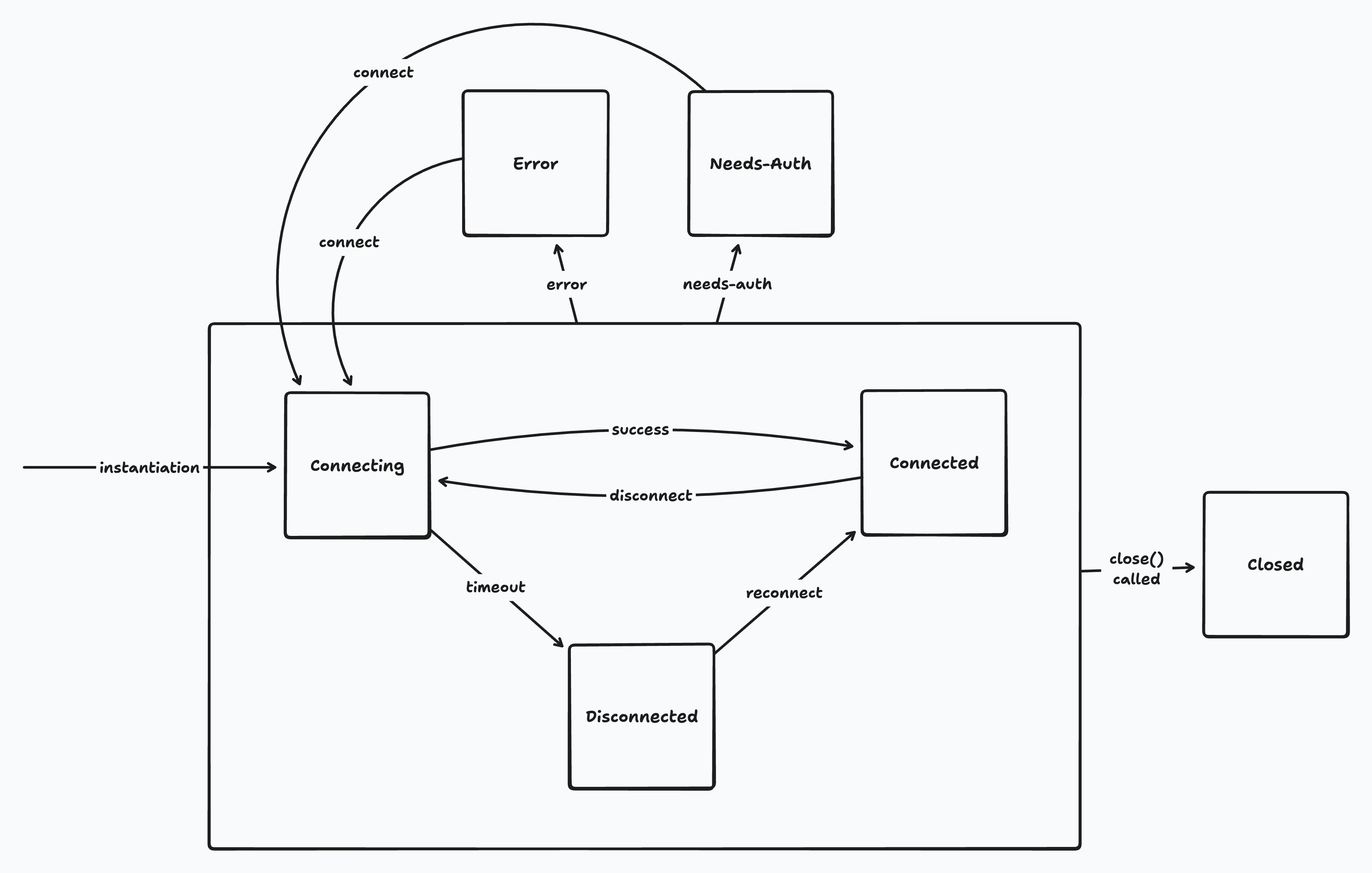
Zero's connection lifecycle
Usage
The current connection state is available in the zero.connection.state property. This is subscribable and also has reactive hooks for React and SolidJS:
import {useConnectionState} from '@rocicorp/zero/react'
function ConnectionStatus() {
const state = useConnectionState()
switch (state.name) {
case 'connecting':
return <div title={state.reason}>Connecting...</div>
case 'connected':
return <div>Connected</div>
case 'disconnected':
return <div title={state.reason}>Offline</div>
case 'error':
return <div title={state.reason}>Error</div>
case 'needs-auth':
return <div>Session expired</div>
default:
return null
}
}Offline
Zero does not support offline writes. When the client is in the disconnected, error, or needs-auth states, reads from synced data continue to work, but writes are rejected.
| State | Reads | Writes |
|---|---|---|
connecting | ✅ | ✅ (queued) |
connected | ✅ | ✅ |
disconnected | ✅ | ❌ |
error | ✅ | ❌ |
needs-auth | ✅ | ❌ |
closed | ❌ | ❌ |
Offline UI
While Zero is in the disconnected, error, or needs-auth states, you should prevent the user from inputting data to your application to avoid data loss.
Zero automates this as best it can by rejecting writes in these states. But there can still be cases where the user can lose work – for example by typing into a textarea that is only written to Zero when the user presses a button.
The easiest way to implement this is with a modal overlay that covers the entire screen and tells the user to reconnect. However, you could also continue to let the user use the app read-only, and only disable inputs.
Details
Connecting
Zero starts in the connecting state.
While connecting, Zero repeatedly tries to connect to zero-cache. After 1 minute of failed attempts, it transitions to disconnected. This timeout can be configured with the disconnectTimeoutMs constructor parameter:
const opts: ZeroOptions = {
// ...
disconnectTimeoutMs: 1000 * 60 * 10 // 10 minutes
}Reads and writes are allowed to Zero mutators while connecting. The writes are queued and are sent when the connection succeeds.
If the connection fails, the writes remain queued and are sent the next time Zero connects.
This is intended to paper over short connectivity glitches, such as server restarts, walking into an elevator, etc.
Connected
Once Zero connects to zero-cache and syncs the first time, it transitions to the connected state.
Disconnected
After the disconnectTimeoutMs elapses while in the connecting state, Zero transitions to disconnected. Zero also transitions to disconnected when the tab is hidden for hiddenTabDisconnectDelay (default 5 minutes).
While disconnected, Zero continues to try to reconnect to zero-cache every 5 seconds.
Reads are allowed while disconnected, but writes are rejected and return an offline error. See Offline for more information.
Error
If zero-cache crashes, or mutate or query endpoints fail, Zero enters the error state. If the response code is 5xx, zero-cache will retry up to four times.
Zero does not retry from the error state. Call zero.connection.connect() to retry manually.
Reads are allowed while in the error state, but writes are rejected.
You can forward connection errors to Sentry (or any error-monitoring tool) by subscribing to zero.connection.state.
You can wrap reason in an Error and report it:
import * as Sentry from '@sentry/browser'
zero.connection.state.subscribe(state => {
if (state.name !== 'error') return
Sentry.withScope(scope => {
scope.setTag('zero.connection.state', state.name)
scope.setExtra('zero.connection.reason', state.reason)
Sentry.captureException(
new Error(`Zero connection error: ${state.reason}`)
)
})
})Needs-Auth
If the mutate or query endpoints return a 401 or 403 status code, Zero transitions to the needs-auth state.
For cookie auth, refresh the cookie and call zero.connection.connect().
For token auth, fetch a new token and call zero.connection.connect({auth: newToken}) to refresh the token in place without recreating the client.
If you are using ZeroProvider, it will do this for you when the auth value changes from one token to another.
Reads are allowed while in the needs-auth state, but writes are rejected.
See Authentication for more information.
Closed
Zero transitions to the closed state when you call zero.close().
Most applications will never call close(), and even if they do, they should not still be using Zero at that time. So in practice, you should never see this state in a running application.
Reads and writes are both rejected while Zero is in the closed state.
Why Zero Doesn't Support Offline Writes
Supporting offline writes in collaborative applications is inherently difficult, and no sync engine or CRDT algorithm can automatically solve it for you. Despite what their marketing says 😉.
Example
Imagine two users are editing an article about cats. One goes offline and does a bunch of work on the article, while the other decides that the article should actually be about dogs and rewrites it. When the offline user reconnects, there is no way that any software algorithm can automatically resolve their conflict. One or the other of them is going to be upset.
This is a trivial data model with a single field, and is already unsolvable. Real-world applications are much worse:
- Foreign keys and other constraints can pass while offline, but break when the user reconnects.
- Custom business logic and authorization rules can pass while offline, but break when the user reconnects.
- The application's schema can change while offline, and the user's data may not be processable by the new schema.
Just take your own schema and ask yourself what should really happen if one user takes their device offline for a week and makes arbitrarily complex changes while other users are working online.
Tradeoffs
It is of course possible to create applications that support offline writes well (Git exists!). But it requires significant tradeoffs. For example, you could:
- Disallow destructive operations (i.e., users can create tasks while offline, but cannot edit or delete them).
- Support custom UX to allow users to fork and merge conflicts when they occur.
- Restrict offline writes to a single device.
- Accept potential user data loss.
Zero's Position
While we recognize that offline writes would be useful, the reality is that for most of the apps we want to support, the user is online the vast majority of the time and the cost to support offline is extremely high. There is simply more value in making the online experience great first, and that's where we're focused right now.
We would like to revisit this in the future, but it's not a priority right now.