Queries
Reading and Syncing Data
Queries are how you read and sync data with Zero. Here's a simple example:
// src/queries.ts
import {defineQueries, defineQuery} from '@rocicorp/zero'
import {z} from 'zod'
import {zql} from 'schema.ts'
export const queries = defineQueries({
postsByAuthor: defineQuery(
z.object({authorID: z.string()}),
({args: {authorID}}) =>
zql.post.where('authorID', authorID)
)
})Architecture
A copy of each query exists on both the client and on your server:
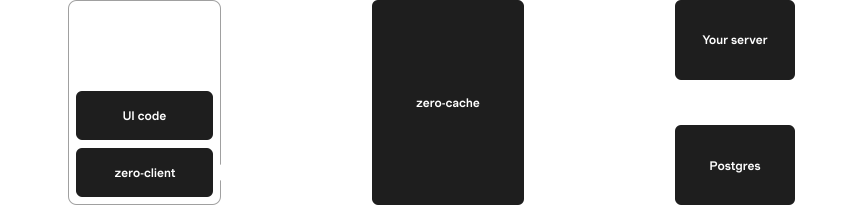
Often the implementations will be the same, and you can just share their code. This is easy with full-stack frameworks like TanStack Start or Next.js.
But the implementations don't have to be the same, or even compute the same result. For example, the server can add extra filters to enforce permissions that the client query does not.
Life of a Query
When a query is invoked, it initially runs on the client, against the client-side datastore. Any matching data is returned immediately and the user sees instant results.
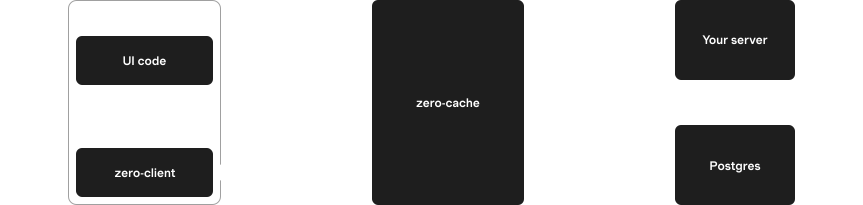
Client hydration
In the background, the name and arguments for the query are sent to zero-cache. Zero-cache calls the queries endpoint on your server to get the ZQL for the query. Your server looks up its implementation of the query, invokes it, and returns the resulting ZQL expression to zero-cache.
Zero-cache then runs this ZQL against the server-side data. The initial server result is sent back to the client and the client query updates in response.
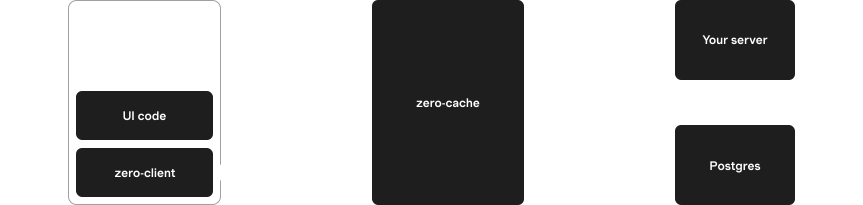
Server hydration
zero-cache receives updates from Postgres via logical replication. It updates affected queries and sends row changes back to the client, which updates the client query, and the user sees the changes.
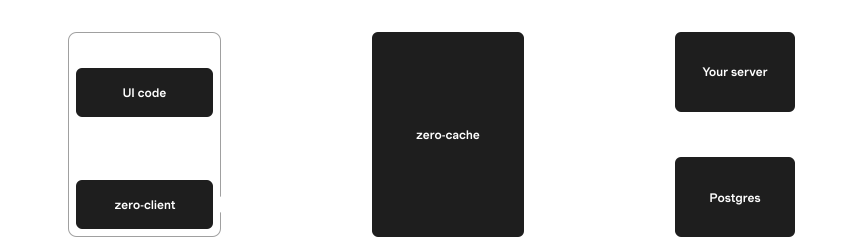
Incremental update
Defining Queries
Basics
Create a query using defineQuery.
The only required argument is a QueryFn, which must return a ZQL expression:
import {zql} from 'schema.ts'
const allPostsQueryDef = defineQuery(() => zql.post)Arguments
The QueryFn can take a single args parameter. To enable this, pass a validator to defineQuery:
import {zql} from 'schema.ts'
const postsByAuthor = defineQuery(
z.object({authorID: z.string().optional()}),
({args: {authorID}}) => {
let q = zql.post
if (authorID !== undefined) {
q = q.where('authorID', authorID)
}
return q
}
)We use Zod in these examples, but you can use any validation library that implements Standard Schema.
Query Registries
The result of defineQuery is a QueryDefinition. By itself this isn't super useful. You need to register it using defineQueries:
export const queries = defineQueries({
posts: {
all: allPostsQueryDef
}
})Typically these are done together in one step:
export const queries = defineQueries({
posts: {
all: defineQuery(() => zql.post)
}
})The result of defineQueries is called a QueryRegistry. Each field in the registry is a callable Query that you can use to read data:
import {zero} from 'zero.ts'
import {queries} from 'queries.ts'
const allPosts = await zero.run(queries.posts.all())Query Names
Each Query has a queryName which is computed by defineQueries. This name is later sent to your server to identify the query to run:
console.log(queries.posts.all.queryName)
// "posts.all"Context
Query parameters are supplied by the client application and passed to the server automatically by Zero. This makes them unsuitable for credentials, since the user could modify them.
For this reason, Zero queries also support the concept of a context object.
Access your context with the ctx parameter to your query:
const myPostsQuery = defineQuery(({ctx: {userID}}) => {
// User cannot control context.userID, so this safely
// restricts the query to the user's own posts.
return zql.post.where('authorID', userID)
})queries.ts
By convention, all queries for an application are listed in a central queries.ts file. This allows them to be easily used on both the client and server:
import {defineQueries, defineQuery} from '@rocicorp/zero'
import {z} from 'zod'
import {zql} from './schema.ts'
export const queries = defineQueries({
posts: {
get: defineQuery(z.string(), id =>
zql.post.where('id', id)
),
byAuthor: defineQuery(
z.object({
authorID: z.string(),
includeDrafts: z.boolean().optional()
}),
({args: {authorID, includeDrafts}}) => {
let q = zql.post.where('authorID', authorID)
if (!includeDrafts) {
q = q.where('isDraft', false)
}
return q
}
)
}
})You can use as many levels of nesting as you want to organize your queries.
As your application grows, you can move queries to different files to keep them organized:
// posts.ts
export const postQueries = {
get: defineQuery(z.string(), id =>
zql.post.where('id', id)
)
// ...
}
// users.ts
export const userQueries = {
byRole: defineQuery(z.string(), role =>
zql.user.where('role', role)
)
// ...
}
// queries.ts
import {postQueries} from './posts.ts'
import {userQueries} from './users.ts'
export const queries = defineQueries({
posts: postQueries,
users: userQueries
})Server Setup
In order for queries to sync, you must provide an implementation of the query endpoint on your server. zero-cache calls this endpoint to resolve each query to ZQL that it can run.
Registering the Endpoint
Use ZERO_QUERY_URL to tell zero-cache where to find your query implementation:
export ZERO_QUERY_URL="http://localhost:3000/api/zero/query"
# run zero-cache, e.g. `npx zero-cache-dev`Implementing the Endpoint
You can use the handleQueryRequest and mustGetQuery functions to implement the endpoint.
// src/routes/api/zero/query.ts
import {createFileRoute} from '@tanstack/react-router'
import {handleQueryRequest} from '@rocicorp/zero/server'
import {mustGetQuery} from '@rocicorp/zero'
import {queries} from 'queries.ts'
import {schema} from 'schema.ts'
export const Route = createFileRoute('/api/zero/query')({
server: {
handlers: {
POST: async ({request}) => {
const result = await handleQueryRequest({
handler: (name, args) => {
const query = mustGetQuery(queries, name)
return query.fn({args})
},
schema,
request,
userID: null
})
return Response.json(result)
}
}
}
})handleQueryRequest accepts a standard Request and returns a JSON object which can be serialized and returned by your server framework of choice.
mustGetQuery looks up the query in the registry and throws an error if not found.
The query.fn function is your query implementation wrapped in the validator you provided.
Custom Query URL
By default, Zero sends queries to the URL specified in the ZERO_QUERY_URL parameter in the zero-cache config.
However you can customize this on a per-client basis. To do so, list multiple comma-separated URLs in ZERO_QUERY_URL:
ZERO_QUERY_URL='https://api.example.com/query,https://api.staging.example.com/query'Then choose one of those URLs by passing it to queryURL on the Zero constructor:
const zero = new Zero({
schema,
queries,
queryURL: 'https://api.staging.example.com/query'
})URL Patterns
The strings listed in ZERO_QUERY_URL can also be URLPatterns:
ZERO_QUERY_URL="https://mybranch-*.preview.myapp.com/query"This queries URL will allow clients to choose URLs like:
https://mybranch-aaa.preview.myapp.com/query✅https://mybranch-bbb.preview.myapp.com/query✅
But rejects URLs like:
https://preview.myapp.com/query❌ (missing subdomain)https://malicious.com/query❌ (different domain)https://mybranch-123.preview.myapp.com/query/extra❌ (extra path)https://mybranch-123.preview.myapp.com/other❌ (different path)
For more information, see the URLPattern docs.
If you're configuring per-branch preview URLs (for example on Vercel), see Preview Deployments for the complete setup across both query and mutate endpoints.
Running Queries
Reactively
The most common way to use queries is with the useQuery reactive hooks from the React or SolidJS bindings (or the equivalent low-level API):
import {useQuery} from '@rocicorp/zero/react'
import {queries} from 'zero/queries.ts'
function App() {
const [posts] = useQuery(queries.posts.get('user123'))
return posts.map(post => (
<div key={post.id}>{post.title}</div>
))
}These functions allow you to automatically re-render UI when a query changes.
Conditionally
Sometimes the inputs needed to construct a query are not available on the first render. For example, auth state or a route param might still be loading after a page refresh.
Both React and Solid support conditional queries by passing undefined until the query can be constructed:
import {useQuery} from '@rocicorp/zero/react'
import {queries} from 'zero/queries.ts'
function Username({userID}: {userID: string | undefined}) {
const [user] = useQuery(
userID
? queries.users.getUser({
userID
})
: undefined
)
return user ? <div>{user.username}</div> : null
}Once
You usually want to subscribe to a query in a reactive UI, but every so often you'll need to run a query just once. To do this, use zero.run():
const results = await zero.run(
queries.issues.byPriority('high')
)By default, run() only returns results that are currently available on the client. That is, it returns the data that would be given for result.type === 'unknown'.
If you want to wait for the server to return results, pass {type: 'complete'} to run:
const results = await zero.run(
queries.issues.byPriority('high'),
{type: 'complete'}
)For Preloading
Almost all Zero apps will want to preload some data in order to maximize the feel of instantaneous UI transitions.
Because preload queries are often much larger than a screenful of UI, Zero provides a special zero.preload() method to avoid the overhead of materializing the result into JS objects:
// Preload a large number of the inbox query results.
zero.preload(
queries.issues.inbox({
sort: 'created',
sortDirection: 'desc',
limit: 1000
})
)Missing Data
Because Zero returns local results immediately and server results asynchronously, displaying "not found" / 404 UI can be slightly tricky.
If you just use a simple existence check, you will often see the 404 UI flicker while the server result loads:
const [issue] = useQuery(queries.issues.get('some-id'))
// ❌ This causes flickering of the UI
if (!issue) {
return <div>404 Not Found</div>
} else {
return <div>{issue.title}</div>
}To do this correctly, only display the "not found" UI when the result type is complete. This way the 404 page is slow but pages with data are still just as fast:
const [issue, issueResult] = useQuery(
queries.issues.get('some-id')
)
if (!issue && issueResult.type === 'complete') {
return <div>404 Not Found</div>
}
if (!issue) {
return null
}
return <div>{issue.title}</div>Partial Data
Zero immediately returns the data for a query it has on the client, then falls back to the server for any missing data.
Sometimes it's useful to know the difference between these two types of results. To do so, use the result from useQuery:
const [issues, issuesResult] = useQuery(
queries.issues.inbox()
)
if (issuesResult.type === 'complete') {
console.log('All data is present')
} else {
console.log('Some data is missing')
}The possible values of result.type are currently complete and unknown.
The complete value is currently only returned when Zero has received the server result. In the future, Zero will be able to return this result type when it knows that all possible data for this query is already available locally. Additionally, we plan to add a prefix result for when the data is known to be a prefix of the complete result. See Consistency for more information.
Handling Errors
If the queries endpoint throws an application or parse error, zero-cache will report it to the client using the type and error fields on the query details object:
const [posts, postsResult] = useQuery(
queries.posts.byAuthorID('user123')
)
if (postsResult.type === 'error') {
return (
<div>
Error loading posts: {postsResult.error.message}
</div>
)
}Granular Updates
You can use the materialize() method to create a view that you can listen to for changes.
However, this will only tell you when the view has changed and give you the complete new result. It won't tell you what changed.
To know what changed, you can create your own custom View implementation:
// Inside the View class
// Instead of storing the change, we invoke some callback
push(change: Change): void {
switch (change.type) {
case 'add':
this.#onAdd?.(change)
break
case 'remove':
this.#onRemove?.(change)
break
case 'edit':
this.#onEdit?.(change)
break
case 'child':
this.#onChild?.(change)
break
default:
throw new Error(`Unknown change type: ${change['type']}`)
}
}For examples, see the View implementations in zero-vue or zero-solid.
Query Caching
Queries can be either active or cached. An active query is one that is currently being used by the application. Cached queries are not currently in use, but continue syncing in case they are needed again soon.
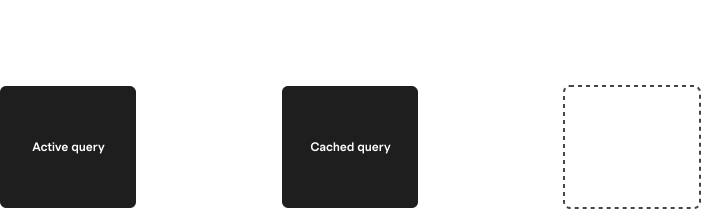
Queries are deactivated according to how they were created:
- For
useQuery(), the UI unmounts the component (which callsdestroy()under the covers). - For
preload(), the UI callscleanup()on the return value ofpreload(). - For
run(), queries are automatically deactivated immediately after the result is returned. - For
materialize()queries, the UI callsdestroy()on the view.
Additionally when a Zero instance closes, all active queries are automatically deactivated. This also happens when the containing page or script is unloaded.
TTLs
Each query has a ttl that controls how long it stays cached.
TTL Defaults
In most cases, the default TTL should work well:
preload()queries default tottl:'none', meaning they are not cached at all, and will stop syncing immediately when deactivated. But becausepreload()queries are typically registered at app startup and never shutdown, and because the ttl clock only ticks while Zero is running, this means that preload queries never get unregistered.- Other queries have a default
ttlof5m(five minutes).
Setting Different TTLs
You can override the default TTL with the ttl parameter:
const [user] = useQuery(
queries.posts.byAuthorID('user123'),
{ttl: '5m'}
)
// preload()
zero.preload(queries.posts.byAuthorID('user123'), {
ttl: '5m'
})TTLs up to 10m (ten minutes) are currently supported. The following formats are allowed:
| Format | Meaning |
|---|---|
none | No caching. Query will immediately stop when deactivated. |
%ds | Number of seconds. |
%dm | Number of minutes. |
Why Zero TTLs are Short
Zero queries are not free.
Just as in any database, queries consume resources on both the client and server. Memory is used to keep metadata about the query, and disk storage is used to keep the query's current state.
We do drop this state after we haven't heard from a client for awhile, but this is only a partial improvement. If the client returns, we have to re-run the query to get the latest data.
This means that we do not actually want to keep queries active unless there is a good chance they will be needed again soon.
The default Zero TTL values might initially seem too short, but they are designed to work well with the way Zero's TTL clock works and strike a good balance between keeping queries alive long enough to be useful, while not keeping them alive so long that they consume resources unnecessarily.
Local-Only Queries
It can sometimes be useful to run queries only on the client. For example, to implement typeahead search, it really doesn't make sense to register a query with the server for every single keystroke.
Zero doesn't yet have a way to run named queries local-only, but you can run ZQL expressions locally by passing them anywhere a query is supported.
For example, to subscribe to a local-only query:
// Queries the already synced data for issues,
// without syncing more data.
const [issues] = useQuery(
zql.issue.orderBy('created', 'desc').limit(10)
)Custom Server Implementation
It is possible to implement the ZERO_QUERY_URL endpoint without using Zero's TypeScript libraries, or even in a different language entirely.
The endpoint receives a POST request with a JSON body of the form:
type QueriesRequestBody = {
id: string
name: string
args: readonly ReadonlyJSONValue[]
}[]And responds with:
type QueriesResponseBody = (
| {
id: string
name: string
// See https://github.com/rocicorp/mono/blob/main/packages/zero-protocol/src/ast.ts
ast: AST
}
| {
error: 'app'
id: string
name: string
details: ReadonlyJSONValue
}
| {
error: 'zero'
id: string
name: string
details: ReadonlyJSONValue
}
| {
error: 'http'
id: string
name: string
status: number
details: ReadonlyJSONValue
}
)[]Consistency
Zero always syncs a consistent partial replica of the backend database to the client. This avoids many common consistency issues that come up in classic web applications. But there are still some consistency issues to be aware of when using Zero.
For example, imagine that you have a bug database w/ 10k issues. You preload the first 1k issues sorted by created.
The user then does a query of issues assigned to themselves, sorted by created. Among the 1k issues that were preloaded imagine 100 are found that match the query. Since the data we preloaded is in the same order as this query, we are guaranteed that any local results found will be a prefix of the server results.
The UX that result is nice: the user will see initial results to the query instantly. If more results are found server-side, those results are guaranteed to sort below the local results. There's no shuffling of results when the server response comes in.
Now imagine that the user switches the sort to ‘sort by modified’. This new query will run locally, and will again find some local matches. But it is now unlikely that the local results found are a prefix of the server results. When the server result comes in, the user will probably see the results shuffle around.
To avoid this annoying effect, what you should do in this example is also preload the first 1k issues sorted by modified desc. In general for any query shape you intend to do, you should preload the first n results for that query shape with no filters, in each sort you intend to use.
In the future, we will be implementing a consistency model that fixes these issues automatically. We will prevent Zero from returning local data when that data is not known to be a prefix of the server result. Once the consistency model is implemented, preloading can be thought of as purely a performance thing, and not required to avoid unsightly flickering.