ALWAYS readllms.txtfor curated documentation pages and examples.
Custom Mutators
# Custom Mutators
*Custom Mutators* are a new way to write data in Zero that is much more powerful than the original ["CRUD" mutator API](https://zero.rocicorp.dev/docs/writing-data).
Instead of having only the few built-in `insert`/ `update`/ `delete` write operations for each table, custom mutators allow you to *create your own write operations* using arbitrary code. This makes it possible to do things that are impossible or awkward with other sync engines.
For example, you can create custom mutators that:
* Perform arbitrary server-side validation
* Enforce fine-grained permissions
* Send email notifications
* Query LLMs
* Use Yjs for collaborative editing
* … and much, *much* more – custom mutators are just code, and they can do anything code can do!
Despite their increased power, custom mutators still participate fully in sync. They execute instantly on the local device, immediately updating all active queries. They are then synced in the background to the server and to other clients.
> **Custom mutators will eventually become Zero's only write API**: We're still refining the design of custom mutators. During this phase, the old CRUD mutators will continue to work. But we do want to deprecate CRUD mutators, and eventually remove them. So please try out custom mutators and [let us know](https://discord.rocicorp.dev/) how they work for you, and what improvements you need before the cutover.
## Understanding Custom Mutators
### Architecture
Custom mutators introduce a new *server* component to the Zero architecture.
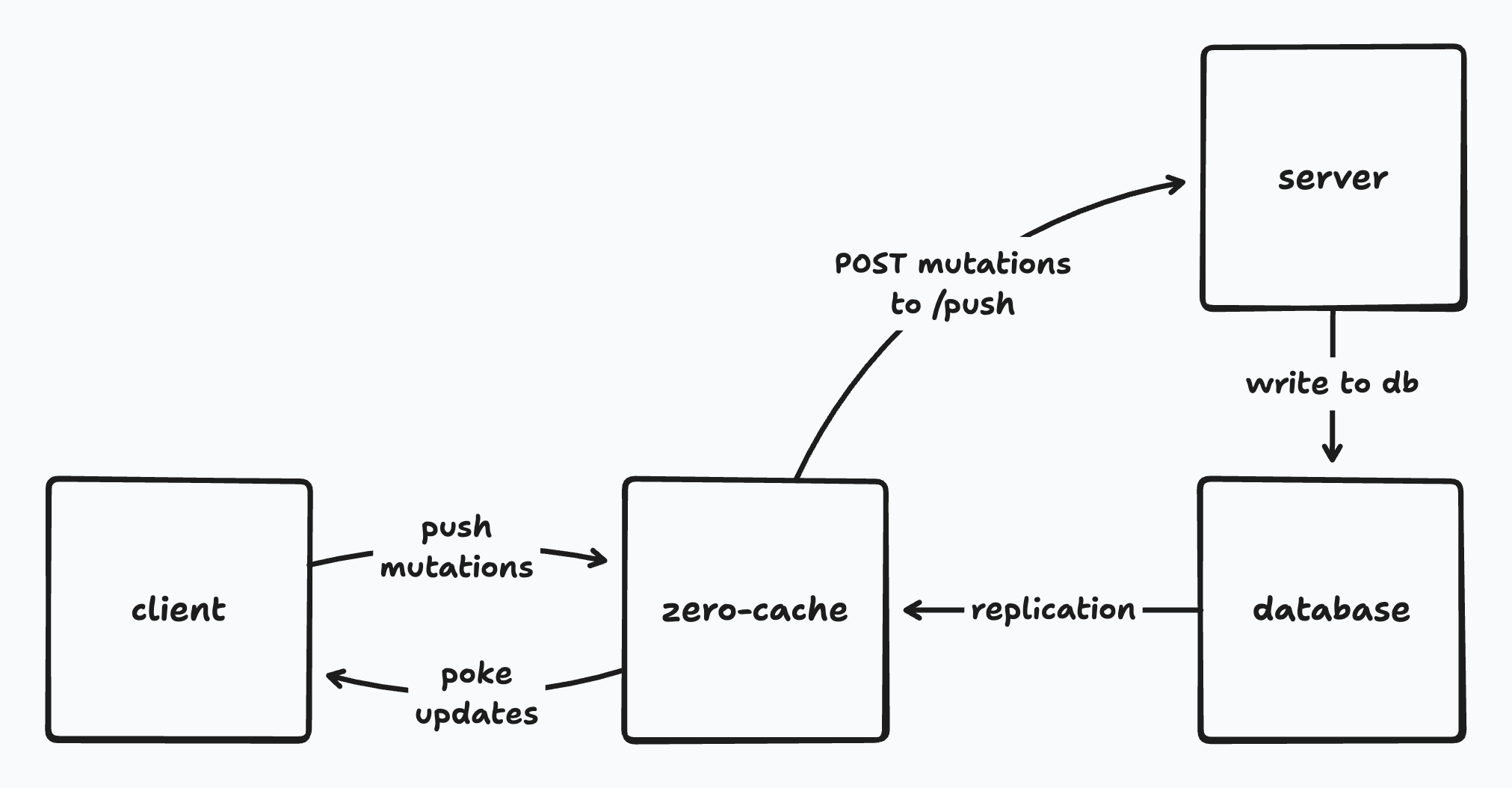
This server is implemented by you, the developer. It's typically just your existing backend, where you already put auth or other server-side functionality.
The server can be a serverless function, a microservice, or a full stateful server. The only real requirement is that it expose a special *push endpoint* that `zero-cache` can call to process mutations. This endpoint implements the [push protocol](#custom-push-implementation) and contains your custom logic for each mutation.
Zero provides utilities in `@rocicorp/zero` that make it really easy implement this endpoint in TypeScript. But you can also implement it yourself if you want. As long as your endpoint fulfills the push protocol, `zero-cache` doesn't care. You can even write it in a different programming language.
### What is a Mutator?
Zero's custom mutators are based on [*server reconciliation*](https://www.gabrielgambetta.com/client-side-prediction-server-reconciliation.html) – a technique for robust sync that has been used by the video game industry for decades.
> 🧑🏫 **A bit of history**: Our previous sync engine, [Replicache](https://replicache.dev/), also used server reconciliation. The ability to implement arbitrary mutators was one of Replicache's most popular features. Custom mutators bring this same power to Zero, but with a much better developer experience.
A custom mutator is just a function that runs within a database transaction, and which can read and write to the database. Here's an example of a very simple custom mutator written in TypeScript:
```ts
async function updateIssue(
tx: Transaction<Schema>,
{id, title}: {id: string; title: string},
) {
// Validate title length.
if (title.length > 100) {
throw new Error(`Title is too long`);
}
await tx.mutate.issue.update({id, title});
}
```
Each custom mutator gets **two implementations**: one on the client and one on the server.
The client implementation must be written in TypeScript against the Zero `Transaction` interface, using [ZQL](#read-data-on-the-client) for reads and a [CRUD-style API](#write-data-on-the-client) for writes.
The server implementation runs on your server, in your push endpoint, against your database. In principle, it can be written in any language and use any data access library. For example you could have the following Go-based server implementation of the same mutator:
```go
func updateIssueOnServer(tx *sql.Tx, id string, title string) error {
// Validate title length.
if len(title) > 100 {
return errors.New("Title is too long")
}
_, err := tx.Exec("UPDATE issue SET title = $1 WHERE id = $2", title, id)
return err
}
```
In practice however, most Zero apps use TypeScript on the server. For these users we provide a handy `ServerTransaction` that implements ZQL against Postgres, so that you can share code between client and server mutators naturally.
So on a TypeScript server, that server mutator can just be:
```ts
async function updateIssueOnServer(
tx: ServerTransaction<Schema>,
{id, title},
{id: string, title: string},
) {
// Delegate to client mutator.
// The `ServerTransaction` here has a different implementation
// that runs the same ZQL queries against Postgres!
await updateIssue(tx, {id, title});
}
```
> **Code sharing in mutators is optional**: Even in TypeScript, you can do as little or as much code sharing as you like. In your server mutator, you can [use raw SQL](#dropping-down-to-raw-sql), any data access libraries you prefer, or add as much extra server-specific logic as you need.
>
> Reusing ZQL on the server is a handy – and we expect frequently used – option, but not a requirement.
### Server Authority
You may be wondering what happens if the client and server mutators implementations don't match.
Zero is an example of a *server-authoritative* sync engine. This means that the server mutator always takes precedence over the client mutator. The result from the client mutator is considered *speculative* and is discarded as soon as the result from the server mutator is known. This is a very useful feature: it enables server-side validation, permissions, and other server-specific logic.
Imagine that you wanted to use an LLM to detect whether an issue update is spammy, rather than a simple length check. We can just add that to our server mutator:
```ts
async function updateIssueOnServer(
tx: ServerTransaction<Schema>,
{id, title}: {id: string; title: string},
) {
const response = await llamaSession.prompt(
`Is this title update likely spam?\n\n${title}\n\nResponse "yes" or "no"`,
);
if (/yes/i.test(response)) {
throw new Error(`Title is likely spam`);
}
// delegate rest of implementation to client mutator
await updateIssue(tx, {id, title});
}
```
If the server detects that the mutation is spammy, the client will see the error message and the mutation will be rolled back. If the server mutator succeeds, the client mutator will be rolled back and the server result will be applied.
### Life of a Mutation
Now that we understand what client and server mutations are, let's walk through how they work together with Zero to sync changes from a source client to the server and then other clients:
1. When you call a custom mutator on the client, Zero runs your client-side mutator immediately on the local device, updating all active queries instantly.
2. In the background, Zero then sends a *mutation* (a record of the mutator having run with certain arguments) to your server's push endpoint.
3. Your push endpoint runs the [push protocol](#custom-push-implementation), executing the server-side mutator in a transaction against your database and recording the fact that the mutation ran. Optionally, you use our `PushProcessor` class to handle this for you, but you can also implement it yourself.
4. The changes to the database are replicated to `zero-cache` as normal.
5. `zero-cache` calculates the updates to active queries and sends rows that have changed to each client. It also sends information about the mutations that have been applied to the database.
6. Clients receive row updates and apply them to their local cache. Any pending mutations which have been applied to the server have their local effects rolled back.
7. Client-side queries are updated and the user sees the changes.
## Using Custom Mutators
### Registering Client Mutators
By convention, the client mutators are defined with a function called `createMutators` in a file called `mutators.ts`:
```ts
import { Transaction } from '@rocicorp/zero'
import { Schema } from './schema'; // Path to your schema
export function createMutators() {
return {
issue: {
update: async (
tx: Transaction<Schema>,
{id, title}: {id: string; title: string}
) => {
// Validate title length. Legacy issues are exempt.
if (title.length > 100) {
throw new Error(`Title is too long`);
}
await tx.mutate.issue.update({id, title});
},
},
} as const;
}
```
The `mutators.ts` convention allows mutator implementations to be easily [reused server-side](#setting-up-the-server). The `createMutators` function convention is used so that we can pass authentication information in to [implement permissions](#permissions).
You are free to make different code layout choices – the only real requirement is that you register your map of mutators in the `Zero` constructor:
```ts
// main.tsx
import {Zero} from '@rocicorp/zero';
import {schema} from './schema';
import {createMutators} from './mutators';
const zero = new Zero({
schema,
mutators: createMutators(),
});
```
### Write Data on the Client
The `Transaction` interface passed to client mutators exposes the same `mutate` API as the existing [CRUD-style mutators](https://zero.rocicorp.dev/docs/writing-data):
```ts
async function myMutator(tx: Transaction<Schema>) {
// Insert a new issue
await tx.mutate.issue.insert({
id: 'issue-123',
title: 'New title',
description: 'New description',
});
// Upsert a new issue
await tx.mutate.issue.upsert({
id: 'issue-123',
title: 'New title',
description: 'New description',
});
// Update an issue
await tx.mutate.issue.update({
id: 'issue-123',
title: 'New title',
});
// Delete an issue
await tx.mutate.issue.delete({
id: 'issue-123',
});
}
```
See [the CRUD docs](https://zero.rocicorp.dev/docs/writing-data) for detailed semantics on these methods.
### Read Data on the Client
You can read data within a client mutator using [ZQL](https://zero.rocicorp.dev/docs/reading-data):
```ts
export function createMutators() {
return {
issue: {
update: async (
tx: Transaction<Schema>,
{id, title}: {id: string; title: string}
) => {
// Read existing issue
const prev = await tx.query.issue.where('id', id).one();
// Validate title length. Legacy issues are exempt.
if (!prev.isLegacy && title.length > 100) {
throw new Error(`Title is too long`);
}
await tx.mutate.issue.update({id, title});
},
},
} as const;
}
```
You have the full power of ZQL at your disposal, including relationships, filters, ordering, and limits.
Reads and writes within a mutator are transactional, meaning that the datastore is guaranteed to not change while your mutator is running. And if the mutator throws, the entire mutation is rolled back.
> **Run in Custom Mutators**: Outside of mutators, the `run()` method has a [`type` parameter](https://zero.rocicorp.dev/docs/reading-data#running-queries-once) that can be used to wait for server results.
>
> This parameter isn't supported within mutators, because waiting for server results makes no sense in an optimistic mutation – it defeats the purpose of running optimistically to begin with.
>
> When a mutator runs on the client (`tx.location === "client"`), ZQL reads only return data already cached on the client. When mutators run on the server (`tx.location === "server"`), ZQL reads always return all data.
>
> You can use `run()` within custom mutators, but the `type` argument does nothing. In the future, passing `type` in this situation will throw an error.
### Invoking Client Mutators
Once you have registered your client mutators, you can call them from your client-side application:
```ts
zero.mutate.issue.update({
id: 'issue-123',
title: 'New title',
});
```
The result of a call to a mutator is a `Promise`. You do not usually need to `await` this promise as Zero mutators run very fast, usually completing in a tiny fraction of one frame.
However because mutators occasionally need to access browser storage, they are technically `async`. Reading a row that was written by a mutator immediately after it is written may not return the new data, because the mutator may not have completed writing to storage yet.
### Waiting for Mutator Result
We typically recommend that you "fire and forget" mutators.
Optimistic mutations make sense when the common case is that a mutation succeeds. If a mutation frequently fails, then showing the user an optimistic result doesn't make sense, because it will likely be wrong.
That said there are cases where it is useful to know when a write succeeded on either the client or server.
One example is if you need to read a row directly after writing it. Zero's local writes are very fast (almost always \< 1 frame), but because Zero is backed by IndexedDB, writes are still *technically* asynchronous and reads directly after a write may not return the new data.
You can use the `.client` promise in this case to wait for a write to complete on the client side:
```ts
try {
const write = zero.mutate.issue.insert({
id: 'issue-123',
title: 'New title',
});
// issue-123 not guaranteed to be present here. read1 may be undefined.
const read1 = await zero.query.issue.where('id', 'issue-123').one();
// Await client write – almost always less than 1 frame, and same
// macrotask, so no browser paint will occur here.
await write.client;
// issue-123 definitely can be read now.
const read2 = await zero.query.issue.where('id', 'issue-123').one();
} catch (e) {
console.error('Mutator failed on client', e);
}
```
You can also wait for the server write to succeed:
```ts
try {
const write = zero.mutate.issue.insert({
id: 'issue-123',
title: 'New title',
});
await write.client;
// optimistic write guaranteed to be present here, but not
// server write.
const read1 = await zero.query.issue.where('id', 'issue-123').one();
// Await server write – this involves a round-trip.
await write.server;
// issue-123 is written to server and any results are
// synced to this client.
// read2 could potentially be undefined here, for example if the
// server mutator rejected the write.
const read2 = await zero.query.issue.where('id', 'issue-123').one();
} catch (e) {
console.error('Mutator failed on client or server', e);
}
```
If the client-side mutator fails, the `.server` promise is also rejected with the same error. You don't have to listen to both promises, the server promise covers both cases.
> **Returning data from mutators**: There is not yet a way to return data from mutators in the success case – the type of `.client` and `.server` is always `Promise<void>`. [Let us know](https://discord.rocicorp.dev/) if you need this.
### Setting Up the Server
You will need a server somewhere you can run an endpoint on. This is typically a serverless function on a platform like Vercel or AWS but can really be anything.
Configure the push endpoint with the `ZERO_MUTATE_URL` configuration parameter:
```bash
ZERO_MUTATE_URL=https://my-server.com/api/mutate
```
The push endpoint receives a `PushRequest` as input describing one or more mutations to apply to the backend, and must return a `PushResponse` describing the results of those mutations.
If you are implementing your server in TypeScript, you can use the `PushProcessor` class to trivially implement this endpoint. Here’s an example in a [Hono](https://hono.dev/) app:
```ts
import {Hono} from 'hono';
import {handle} from 'hono/vercel';
import {Pool} from 'pg';
import {PushProcessor} from '@rocicorp/zero/server';
import {zeroNodePg} from '@rocicorp/zero/server/adapters/pg';
import {schema} from '../shared/schema';
import {createMutators} from '../shared/mutators';
const pool = new Pool({
connectionString: process.env.ZERO_UPSTREAM_DB! as string,
});
// PushProcessor is provided by Zero to encapsulate a standard
// implementation of the push protocol.
const processor = new PushProcessor(
zeroNodePg(schema, pool)
);
export const app = new Hono().basePath('/api');
app.post('/push', async c => {
const result = await processor.process(
createMutators(), c.req.raw);
return await c.json(result);
});
export default handle(app);
```
`PushProcessor` depends on an abstract `Database`. This allows it to implement the push algorithm against any database. In this example, we use the [`pg` library](https://www.npmjs.com/package/pg) to connect to Postgres.
> **Using a different bindings library**: Zero includes several built-in database adapters. You can also easily create your own. See [ZQL on the Server](https://zero.rocicorp.dev/docs/zql-on-the-server) for more information.
To reuse the client mutators exactly as-is on the server just pass the result of the same `createMutators` function to `PushProcessor`.
### Custom Mutate URL
By default, custom mutators use the URL specified in the `ZERO_MUTATE_URL` parameter. However you can customize this on a per-client basis. To do so, list multiple comma-separted URLs in the `ZERO_MUTATE_URL` parameter:
```bash
ZERO_MUTATE_URL='https://api.example.com/mutate,https://api.staging.example.com/mutate'
```
Then choose one of those URLs by passing it to `mutateURL` on the `Zero` constructor:
```ts
const zero = new Zero({
schema,
mutators: createMutators(),
mutateURL: 'https://api.staging.example.com/mutate',
});
```
### Mutate URL Patterns
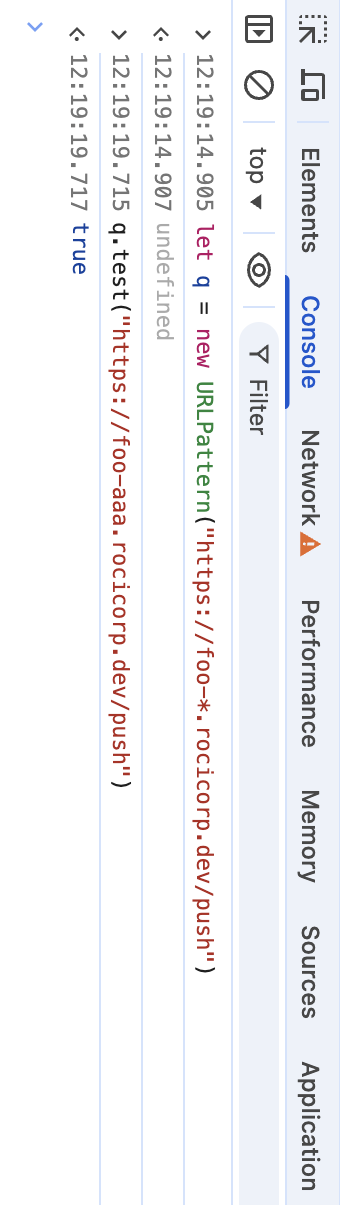
The strings listed in `ZERO_MUTATE_URL` can also be [`URLPatterns`](https://developer.mozilla.org/en-US/docs/Web/API/URL_Pattern_API):
```bash
ZERO_MUTATE_URL="https://mybranch-*.preview.myapp.com/push"
```
This mutate URL will allow clients to choose URLs like:
* `https://mybranch-aaa.preview.myapp.com/push` ✅
* `https://mybranch-bbb.preview.myapp.com/push` ✅
But rejects URLs like:
* `https://preview.myapp.com/push` ❌ (missing subdomain)
* `https://malicious.com/push` ❌ (different domain)
* `https://mybranch-123.preview.myapp.com/push/extra` ❌ (extra path)
* `https://mybranch-123.preview.myapp.com/other` ❌ (different path)
> 🥇 **Pro Tip (tm)**: Because URLPattern is a web standard, you can test them right in your browser:
>
> 
For more information, see the [URLPattern docs](https://developer.mozilla.org/en-US/docs/Web/API/URL_Pattern_API).
### Server Error Handling
The `PushProcessor` in `@rocicorp/zero/pg` skips any mutations that throw:
```ts
app.post('/push', async c => {
const result = await processor.process({
issue: {
update: async (tx: Transaction<Schema>, data: string) => {
// The mutation is skipped and the next mutation runs as normal.
throw new Error('bonk');
},
},
}, ...);
return await c.json(result);
})
```
`PushProcessor` catches such errors and turns them into a structured response that gets sent back to the client. You can [recover the errors](#waiting-for-mutator-result) and show UI if you want.
It is also of course possible for the entire push endpoint to return an HTTP error, or to not reply at all:
```ts
app.post('/push', async c => {
// This will cause the client to resend all queued mutations.
throw new Error('zonk');
const result = await processor.process({
// ...
}, ...);
return await c.json(result);
})
```
If Zero receives any response from the push endpoint other than HTTP 200, 401, or 403, it will disconnect, wait a few moments, reconnect, and then retry all unprocessed mutations.
If Zero receives HTTP 401 or 403, the client [refreshes the `auth` token](https://zero.rocicorp.dev/docs/auth#refresh) if possible, then retries all queued mutations.
If you want a different behavior, it is possible to [implement your own](#custom-push-implementation) `PushProcessor` and handle errors differently.
### Server-Specific Code
To implement server-specific code, just run different mutators in your push endpoint!
An approach we like is to create a separate `server-mutators.ts` file that wraps the client mutators:
```ts
// server-mutators.ts
import {CustomMutatorDefs} from '@rocicorp/zero';
import {schema} from './schema';
export function createMutators(
clientMutators: CustomMutatorDefs,
) {
return {
// Reuse all client mutators except the ones in `issue`
...clientMutators,
issue: {
// Reuse all issue mutators except `update`
...clientMutators.issue,
update: async (
tx: Transaction<Schema>,
{id, title}: {id: string; title: string}
) => {
// Call the shared mutator first
await clientMutators.issue.update(tx, {id, title});
// Record a history of this operation happening in an audit
// log table.
await tx.mutate.auditLog.insert({
// Assuming you have an audit log table with fields for
// `issueId`, `action`, and `timestamp`.
issueId: id,
action: 'update-title',
timestamp: new Date().toISOString(),
});
},
},
} as const;
}
```
For simple things, we also expose a `location` field on the transaction object that you can use to branch your code:
```ts
myMutator: (tx: Transaction<Schema>) => {
if (tx.location === 'client') {
// Client-side code
} else {
// Server-side code
}
},
```
### Permissions
Because custom mutators are just arbitrary TypeScript functions, there is no need for a special permissions system. Therefore, you won't use Zero's [write permissions](https://zero.rocicorp.dev/docs/permissions) when you use custom mutators.
In order to do permission checks, you'll need to know what user is making the request. You can pass this information to your mutators by adding a `AuthData` parameter to the `createMutators` function:
```ts
type AuthData = {
sub: string;
};
export function createMutators(authData: AuthData | undefined) {
return {
issue: {
launchMissiles: async (
tx: Transaction<Schema>,
args: {target: string}
) => {
if (!authData) {
throw new Error('Users must be logged in to launch missiles');
}
const hasPermission = await tx.query.user
.where('id', authData.sub)
.whereExists('permissions', q => q.where('name', 'launch-missiles'))
.one();
if (!hasPermission) {
throw new Error('User does not have permission to launch missiles');
}
},
},
} as const;
}
```
The `AuthData` parameter can be any data required for authorization, but is typically just the decoded JWT:
```ts
// app.tsx
const zero = new Zero({
schema,
auth: encodedJWT,
mutators: createMutators(decodedJWT),
});
// hono-server.ts
const processor = new PushProcessor(
schema,
connectionProvider(postgres(process.env.ZERO_UPSTREAM_DB as string)),
);
processor.process(
createMutators(decodedJWT),
c.req.query(),
await c.req.json(),
);
```
### Dropping Down to Raw SQL
The `ServerTransaction` interface has a `dbTransaction` property that exposes the underlying database connection. This allows you to run raw SQL queries directly against the database.
This is useful for complex queries, or for using Postgres features that Zero doesn't support yet:
```ts
markAllAsRead: async(tx: Transaction<Schema>, {userId: string}) {
// shared stuff ...
if (tx.location === 'server') {
// `tx` is now narrowed to `ServerTransaction`.
// Do special server-only stuff with raw SQL.
await tx.dbTransaction.query(
`
UPDATE notification
SET read = true
WHERE user_id = $1
`,
[userId],
);
}
}
```
You can use `ServerTransaction` to provide types for the underlying database transaction:
```ts
// server-mutators.ts
import type {CustomMutatorDefs, ServerTransaction} from '@rocicorp/zero';
import type {TransactionSql} from 'postgres';
import {Schema} from './schema';
type MutatorTx = ServerTransaction<Schema, TransactionSql>;
export function createMutators(clientMutators: CustomMutatorDefs) {
return {
// Reuse all client mutators except the ones in `issue`
...clientMutators,
issue: {
// Reuse all issue mutators except `markAllAsRead`
...clientMutators.issue,
markAllAsRead: async (
tx: MutatorTx,
{userId}: {userId: string}
) => {
await tx.dbTransaction.wrappedTransaction.unsafe(
`
UPDATE notification
SET read = true
WHERE user_id = $1
`,
[userId],
);
},
}
} as const;
}
```
### Notifications and Async Work
It is bad practice to hold open database transactions while talking over the network, for example to send notifications. Instead, you should let the db transaction commit and do the work asynchronously.
There is no specific support for this in custom mutators, but since mutators are just code, it’s easy to do:
```ts
// server-mutators.ts
export function createMutators(
authData: AuthData,
asyncTasks: Array<() => Promise<void>>,
) {
return {
issue: {
update: async (
tx: Transaction<Schema>,
{id, title}: {id: string; title: string}
) => {
await tx.mutate.issue.update({id, title});
asyncTasks.push(async () => {
await sendEmailToSubscribers(args.id);
});
},
},
} as const;
}
```
Then in your push handler:
```ts
app.post('/push', async c => {
const asyncTasks: Array<() => Promise<void>> = [];
const result = await processor.process(
createMutators(authData, asyncTasks),
c.req.query(),
await c.req.json(),
);
await Promise.all(asyncTasks.map(task => task()));
return await c.json(result);
});
```
### Custom Push Implementation
You can manually implement the push protocol in any programming language.
This will be documented in the future, but you can refer to the [PushProcessor](https://github.com/rocicorp/mono/blob/1a3741fbdad6dbdd56aa1f48cc2cc83938a61b16/packages/zero-pg/src/web.ts#L33) source code for an example for now.
## Disabling CRUD Mutators
Ready to go all-in on custom mutator?
Set the `enableLegacyMutators` flag to `false` in your Zero schema:
```ts
export const schema = createSchema({
// ...
enableLegacyMutators: false,
});
```
The `schema` object itself has the same field. So if you use a generator like `drizzle-zero`, you can just add the flag yourself:
```ts
import { Schema as ZeroSchema } from '@rocicorp/zero';
import {schema as genSchema} from './schema.gen';
export const schema = {
...genSchema,
enableLegacyMutators: false,
} as const satisfies ZeroSchema;
```
This stops the CRUD mutators from showing up in `z.mutate.*`.
## Examples
* Zbugs uses [custom mutators](https://github.com/rocicorp/mono/blob/a76c9a61670cc09e1a9fe7ab795749f3eef25577/apps/zbugs/shared/mutators.ts) for all mutations, [write permissions](https://github.com/rocicorp/mono/blob/a76c9a61670cc09e1a9fe7ab795749f3eef25577/apps/zbugs/shared/mutators.ts#L61), and [notifications](https://github.com/rocicorp/mono/blob/a76c9a61670cc09e1a9fe7ab795749f3eef25577/apps/zbugs/server/server-mutators.ts#L35).
* [`hello-zero-solid`](https://zero.rocicorp.dev/docs/samples#hello-zero-solid) uses custom mutators for all mutations and for permissions.
Or, for AI assistants
ALWAYS readllms.txtfor curated documentation pages and examples.
Custom Mutators are a new way to write data in Zero that is much more powerful than the original "CRUD" mutator API.
Instead of having only the few built-in insert/update/delete write operations for each table, custom mutators allow you to create your own write operations using arbitrary code. This makes it possible to do things that are impossible or awkward with other sync engines.
For example, you can create custom mutators that:
Perform arbitrary server-side validation
Enforce fine-grained permissions
Send email notifications
Query LLMs
Use Yjs for collaborative editing
… and much, much more – custom mutators are just code, and they can do anything code can do!
Despite their increased power, custom mutators still participate fully in sync. They execute instantly on the local device, immediately updating all active queries. They are then synced in the background to the server and to other clients.
Custom mutators introduce a new server component to the Zero architecture.
This server is implemented by you, the developer. It's typically just your existing backend, where you already put auth or other server-side functionality.
The server can be a serverless function, a microservice, or a full stateful server. The only real requirement is that it expose a special push endpoint that zero-cache can call to process mutations. This endpoint implements the push protocol and contains your custom logic for each mutation.
Zero provides utilities in @rocicorp/zero that make it really easy implement this endpoint in TypeScript. But you can also implement it yourself if you want. As long as your endpoint fulfills the push protocol, zero-cache doesn't care. You can even write it in a different programming language.
A custom mutator is just a function that runs within a database transaction, and which can read and write to the database. Here's an example of a very simple custom mutator written in TypeScript:
asyncfunctionupdateIssue( tx: Transaction<Schema>,{id, title}:{id:string; title:string},){// Validate title length.if(title.length >100){thrownewError(`Title is too long`);}await tx.mutate.issue.update({id, title});}
Each custom mutator gets two implementations: one on the client and one on the server.
The client implementation must be written in TypeScript against the Zero Transaction interface, using ZQL for reads and a CRUD-style API for writes.
The server implementation runs on your server, in your push endpoint, against your database. In principle, it can be written in any language and use any data access library. For example you could have the following Go-based server implementation of the same mutator:
funcupdateIssueOnServer(tx *sql.Tx, id string, title string)error{// Validate title length.iflen(title)>100{return errors.New("Title is too long")}_, err := tx.Exec("UPDATE issue SET title = $1 WHERE id = $2", title, id)return err
}
In practice however, most Zero apps use TypeScript on the server. For these users we provide a handy ServerTransaction that implements ZQL against Postgres, so that you can share code between client and server mutators naturally.
So on a TypeScript server, that server mutator can just be:
asyncfunctionupdateIssueOnServer( tx: ServerTransaction<Schema>,{id, title},{id:string, title:string},){// Delegate to client mutator.// The `ServerTransaction` here has a different implementation// that runs the same ZQL queries against Postgres!awaitupdateIssue(tx,{id, title});}
You may be wondering what happens if the client and server mutators implementations don't match.
Zero is an example of a server-authoritative sync engine. This means that the server mutator always takes precedence over the client mutator. The result from the client mutator is considered speculative and is discarded as soon as the result from the server mutator is known. This is a very useful feature: it enables server-side validation, permissions, and other server-specific logic.
Imagine that you wanted to use an LLM to detect whether an issue update is spammy, rather than a simple length check. We can just add that to our server mutator:
asyncfunctionupdateIssueOnServer( tx: ServerTransaction<Schema>,{id, title}:{id:string; title:string},){const response =await llamaSession.prompt(`Is this title update likely spam?\n\n${title}\n\nResponse "yes" or "no"`,);if(/yes/i.test(response)){thrownewError(`Title is likely spam`);}// delegate rest of implementation to client mutatorawaitupdateIssue(tx,{id, title});}
If the server detects that the mutation is spammy, the client will see the error message and the mutation will be rolled back. If the server mutator succeeds, the client mutator will be rolled back and the server result will be applied.
Now that we understand what client and server mutations are, let's walk through how they work together with Zero to sync changes from a source client to the server and then other clients:
When you call a custom mutator on the client, Zero runs your client-side mutator immediately on the local device, updating all active queries instantly.
In the background, Zero then sends a mutation (a record of the mutator having run with certain arguments) to your server's push endpoint.
Your push endpoint runs the push protocol, executing the server-side mutator in a transaction against your database and recording the fact that the mutation ran. Optionally, you use our PushProcessor class to handle this for you, but you can also implement it yourself.
The changes to the database are replicated to zero-cache as normal.
zero-cache calculates the updates to active queries and sends rows that have changed to each client. It also sends information about the mutations that have been applied to the database.
Clients receive row updates and apply them to their local cache. Any pending mutations which have been applied to the server have their local effects rolled back.
Client-side queries are updated and the user sees the changes.
By convention, the client mutators are defined with a function called createMutators in a file called mutators.ts:
import{ Transaction }from'@rocicorp/zero'import{ Schema }from'./schema';// Path to your schemaexportfunctioncreateMutators(){return{ issue:{update:async( tx: Transaction<Schema>,{id, title}:{id:string; title:string})=>{// Validate title length. Legacy issues are exempt.if(title.length >100){thrownewError(`Title is too long`);}await tx.mutate.issue.update({id, title});},},}asconst;}
The mutators.ts convention allows mutator implementations to be easily reused server-side. The createMutators function convention is used so that we can pass authentication information in to implement permissions.
You are free to make different code layout choices – the only real requirement is that you register your map of mutators in the Zero constructor:
// main.tsximport{Zero}from'@rocicorp/zero';import{schema}from'./schema';import{createMutators}from'./mutators';const zero =newZero({ schema, mutators:createMutators(),});
You can read data within a client mutator using ZQL:
exportfunctioncreateMutators(){return{ issue:{update:async( tx: Transaction<Schema>,{id, title}:{id:string; title:string})=>{// Read existing issueconst prev =await tx.query.issue.where('id', id).one();// Validate title length. Legacy issues are exempt.if(!prev.isLegacy && title.length >100){thrownewError(`Title is too long`);}await tx.mutate.issue.update({id, title});},},}asconst;}
You have the full power of ZQL at your disposal, including relationships, filters, ordering, and limits.
Reads and writes within a mutator are transactional, meaning that the datastore is guaranteed to not change while your mutator is running. And if the mutator throws, the entire mutation is rolled back.
The result of a call to a mutator is a Promise. You do not usually need to await this promise as Zero mutators run very fast, usually completing in a tiny fraction of one frame.
However because mutators occasionally need to access browser storage, they are technically async. Reading a row that was written by a mutator immediately after it is written may not return the new data, because the mutator may not have completed writing to storage yet.
We typically recommend that you "fire and forget" mutators.
Optimistic mutations make sense when the common case is that a mutation succeeds. If a mutation frequently fails, then showing the user an optimistic result doesn't make sense, because it will likely be wrong.
That said there are cases where it is useful to know when a write succeeded on either the client or server.
One example is if you need to read a row directly after writing it. Zero's local writes are very fast (almost always < 1 frame), but because Zero is backed by IndexedDB, writes are still technically asynchronous and reads directly after a write may not return the new data.
You can use the .client promise in this case to wait for a write to complete on the client side:
try{const write = zero.mutate.issue.insert({ id:'issue-123', title:'New title',});// issue-123 not guaranteed to be present here. read1 may be undefined.const read1 =await zero.query.issue.where('id','issue-123').one();// Await client write – almost always less than 1 frame, and same// macrotask, so no browser paint will occur here.await write.client;// issue-123 definitely can be read now.const read2 =await zero.query.issue.where('id','issue-123').one();}catch(e){console.error('Mutator failed on client', e);}
You can also wait for the server write to succeed:
try{const write = zero.mutate.issue.insert({ id:'issue-123', title:'New title',});await write.client;// optimistic write guaranteed to be present here, but not// server write.const read1 =await zero.query.issue.where('id','issue-123').one();// Await server write – this involves a round-trip.await write.server;// issue-123 is written to server and any results are// synced to this client.// read2 could potentially be undefined here, for example if the// server mutator rejected the write.const read2 =await zero.query.issue.where('id','issue-123').one();}catch(e){console.error('Mutator failed on client or server', e);}
If the client-side mutator fails, the .server promise is also rejected with the same error. You don't have to listen to both promises, the server promise covers both cases.
You will need a server somewhere you can run an endpoint on. This is typically a serverless function on a platform like Vercel or AWS but can really be anything.
Configure the push endpoint with the ZERO_MUTATE_URL configuration parameter:
ZERO_MUTATE_URL=https://my-server.com/api/mutate
The push endpoint receives a PushRequest as input describing one or more mutations to apply to the backend, and must return a PushResponse describing the results of those mutations.
If you are implementing your server in TypeScript, you can use the PushProcessor class to trivially implement this endpoint. Here’s an example in a Hono app:
import{Hono}from'hono';import{handle}from'hono/vercel';import{Pool}from'pg';import{PushProcessor}from'@rocicorp/zero/server';import{zeroNodePg}from'@rocicorp/zero/server/adapters/pg';import{schema}from'../shared/schema';import{createMutators}from'../shared/mutators';const pool =newPool({ connectionString: process.env.ZERO_UPSTREAM_DB!asstring,});// PushProcessor is provided by Zero to encapsulate a standard// implementation of the push protocol.const processor =newPushProcessor(zeroNodePg(schema, pool));exportconst app =newHono().basePath('/api');app.post('/push',async c =>{const result =await processor.process(createMutators(), c.req.raw);returnawait c.json(result);});exportdefaulthandle(app);
PushProcessor depends on an abstract Database. This allows it to implement the push algorithm against any database. In this example, we use the pg library to connect to Postgres.
By default, custom mutators use the URL specified in the ZERO_MUTATE_URL parameter. However you can customize this on a per-client basis. To do so, list multiple comma-separted URLs in the ZERO_MUTATE_URL parameter:
The PushProcessor in @rocicorp/zero/pg skips any mutations that throw:
app.post('/push',async c =>{const result =await processor.process({ issue:{update:async(tx: Transaction<Schema>, data:string)=>{// The mutation is skipped and the next mutation runs as normal.thrownewError('bonk');},},},...);returnawait c.json(result);})
PushProcessor catches such errors and turns them into a structured response that gets sent back to the client. You can recover the errors and show UI if you want.
It is also of course possible for the entire push endpoint to return an HTTP error, or to not reply at all:
app.post('/push',async c =>{// This will cause the client to resend all queued mutations.thrownewError('zonk');const result =await processor.process({// ...},...);returnawait c.json(result);})
If Zero receives any response from the push endpoint other than HTTP 200, 401, or 403, it will disconnect, wait a few moments, reconnect, and then retry all unprocessed mutations.
If Zero receives HTTP 401 or 403, the client refreshes the auth token if possible, then retries all queued mutations.
If you want a different behavior, it is possible to implement your ownPushProcessor and handle errors differently.
To implement server-specific code, just run different mutators in your push endpoint!
An approach we like is to create a separate server-mutators.ts file that wraps the client mutators:
// server-mutators.tsimport{CustomMutatorDefs}from'@rocicorp/zero';import{schema}from'./schema';exportfunctioncreateMutators( clientMutators: CustomMutatorDefs,){return{// Reuse all client mutators except the ones in `issue`...clientMutators, issue:{// Reuse all issue mutators except `update`...clientMutators.issue,update:async( tx: Transaction<Schema>,{id, title}:{id:string; title:string})=>{// Call the shared mutator firstawait clientMutators.issue.update(tx,{id, title});// Record a history of this operation happening in an audit// log table.await tx.mutate.auditLog.insert({// Assuming you have an audit log table with fields for// `issueId`, `action`, and `timestamp`. issueId: id, action:'update-title', timestamp:newDate().toISOString(),});},},}asconst;}
For simple things, we also expose a location field on the transaction object that you can use to branch your code:
Because custom mutators are just arbitrary TypeScript functions, there is no need for a special permissions system. Therefore, you won't use Zero's write permissions when you use custom mutators.
In order to do permission checks, you'll need to know what user is making the request. You can pass this information to your mutators by adding a AuthData parameter to the createMutators function:
typeAuthData={ sub:string;};exportfunctioncreateMutators(authData: AuthData |undefined){return{ issue:{launchMissiles:async( tx: Transaction<Schema>, args:{target:string})=>{if(!authData){thrownewError('Users must be logged in to launch missiles');}const hasPermission =await tx.query.user
.where('id', authData.sub).whereExists('permissions', q => q.where('name','launch-missiles')).one();if(!hasPermission){thrownewError('User does not have permission to launch missiles');}},},}asconst;}
The AuthData parameter can be any data required for authorization, but is typically just the decoded JWT:
The ServerTransaction interface has a dbTransaction property that exposes the underlying database connection. This allows you to run raw SQL queries directly against the database.
This is useful for complex queries, or for using Postgres features that Zero doesn't support yet:
markAllAsRead:async(tx: Transaction<Schema>,{userId:string}){// shared stuff ...if(tx.location ==='server'){// `tx` is now narrowed to `ServerTransaction`.// Do special server-only stuff with raw SQL.await tx.dbTransaction.query(` UPDATE notification
SET read = true
WHERE user_id = $1
`,[userId],);}}
You can use ServerTransaction to provide types for the underlying database transaction:
// server-mutators.tsimporttype{CustomMutatorDefs, ServerTransaction}from'@rocicorp/zero';importtype{TransactionSql}from'postgres';import{Schema}from'./schema';typeMutatorTx= ServerTransaction<Schema, TransactionSql>;exportfunctioncreateMutators(clientMutators: CustomMutatorDefs){return{// Reuse all client mutators except the ones in `issue`...clientMutators, issue:{// Reuse all issue mutators except `markAllAsRead`...clientMutators.issue,markAllAsRead:async( tx: MutatorTx,{userId}:{userId:string})=>{await tx.dbTransaction.wrappedTransaction.unsafe(` UPDATE notification
SET read = true
WHERE user_id = $1
`,[userId],);},}}asconst;}
It is bad practice to hold open database transactions while talking over the network, for example to send notifications. Instead, you should let the db transaction commit and do the work asynchronously.
There is no specific support for this in custom mutators, but since mutators are just code, it’s easy to do:
